Codenames: Rules and UI Guide
Codenames puts red and blue in front of a 5×5 word wall. Each team has one spymaster who sees the key; the other players are operatives who see only the words. The spymaster connects friendly cards with one word and one number, then the operatives reveal cards from that clue. Find every friendly agent first, and never reveal the Assassin.
Players, teams, and the key
- Supports 4 or 6 players, split evenly between red and blue.
- In a 4-player game, each team has one spymaster and one operative.
- In a 6-player game, each team has one spymaster and two operatives.
- The starting team has 9 agent cards; the other team has 8.
- The rest of the wall contains 7 Bystanders and 1 Assassin.
- Teams and roles are public. Only spymasters see the identities of unrevealed cards.
Start a match
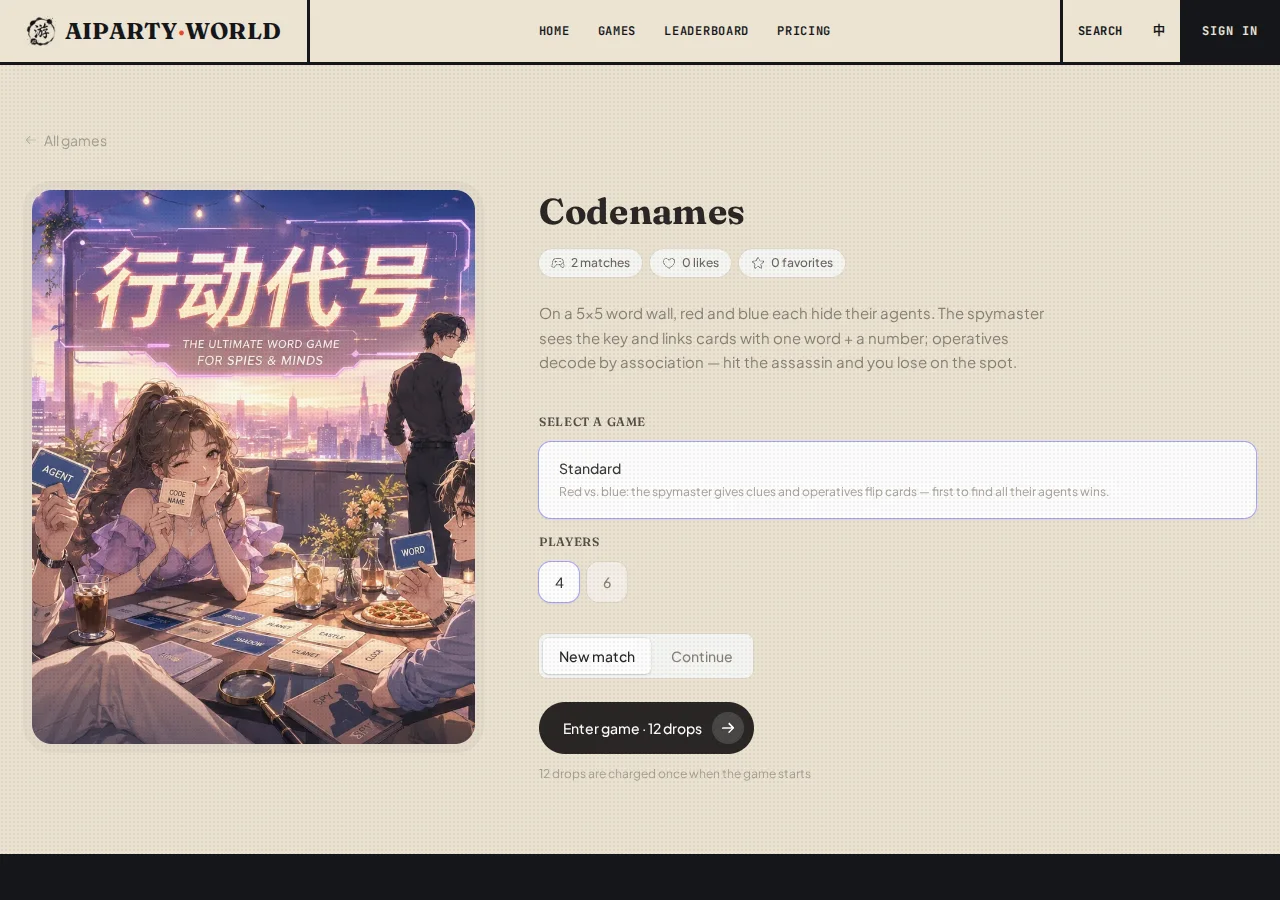
- Select Standard under the game mode.
- Choose 4 or 6 under Players. This total includes you, AI teammates, and AI opponents.
- Keep New match selected, check the drop cost on the button, then press Enter game.
- Enter a nickname if prompted. The opening card tells you your color and whether you are the Spymaster or an Operative.
Press the role card to continue. Roles remain fixed for this match. The 4- and 6-player options change the number of operatives, not the wall or the core rules.
Read the studio
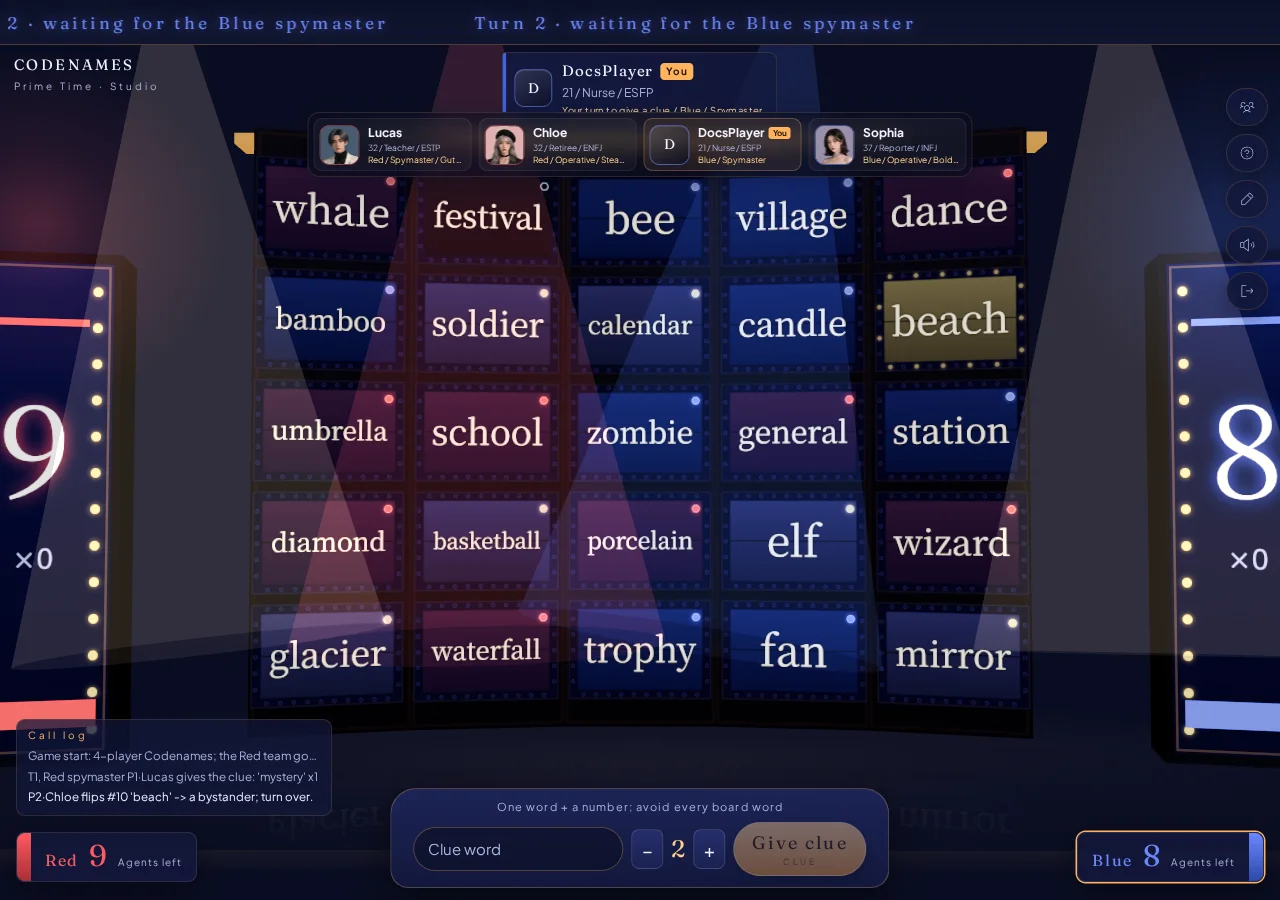
- Word wall: Unrevealed cards show words. A revealed card shows a red agent, blue agent, Bystander, or Assassin result.
- Top marquee: Shows the turn, active team, current clue, and remaining guesses.
- Side scoreboards: Show how many agents each team still needs. The first counter to reach zero wins.
- Player strip: Shows seat, team, public role, and current actor. Your seat has a you tag.
- Production log: Records every clue, reveal, and pass, which helps when revisiting an older clue.
- Bottom console: A spymaster gets the clue composer. An operative gets Reveal and Pass.
Play as the spymaster
The key colors the full wall for you. Open Booth to review the lineup and use Show key / Hide key to compare your view with what the operatives can see.
On your clue turn:
- Enter one word with no spaces in the Clue word field.
- Use the minus and plus controls to set a count from 1 to 9. The count says how many friendly cards you intend to connect.
- Check whether the clue points even more strongly at the Assassin, a Bystander, or an enemy agent.
- Press Give clue. Once submitted, the operatives begin guessing and you cannot add an explanation.
The clue cannot equal an unrevealed wall word. It also cannot contain an unrevealed word or be contained by one. The interface catches obvious violations, and the referee validates the clue again.
Play as an operative
The marquee displays the active clue and Guesses left. A clue permits at most the clue count + 1 reveals. The bonus reveal can revisit an older clue.
- Click an unrevealed word on the wall so it becomes selected.
- Press Reveal in the console. Selecting a word alone does not submit it.
- A friendly agent lets the team continue while guesses remain. With two operatives, the next teammate rotates in.
- Pass becomes available only after the team has made at least one reveal this turn. Use it when the remaining association is too risky.
Each reveal has one of four outcomes:
- Your agent: Keep guessing, pass, or stop when the budget is exhausted.
- Enemy agent: Advance the enemy by one and end your turn. Revealing their last agent makes them win immediately.
- Bystander: End your turn immediately.
- Assassin: Your team loses immediately.
Controls and table discipline
- Booth reopens the team, seat, and role lineup. A spymaster can also toggle the key there.
- The right-side controls open the rules, rename dialog, sound toggle, and exit confirmation.
- The clue number is a maximum target, not a demand to use every guess. Once one reveal is complete, passing is legal.
- A safe clue for two is often better than a strained clue for four. Check the Assassin association before chasing a larger count.