One Night Werewolf: Rules and UI Guide
One Night Werewolf has one night, two daytime speaking rounds, and one simultaneous vote. Cards may move during the night. Your dealt card grants your night action, but the final card in front of your seat determines your team at scoring.
Player counts and decks
The game supports 5 / 6 / 7 players, with three extra cards face down in the center:
- 5 players: 2 Werewolves, Seer, Robber, Troublemaker, and 3 Villagers. The 5-player deck has no Insomniac.
- 6 players: Add the Insomniac to the 5-player deck.
- 7 players: Add one more Villager to the 6-player deck.
The deck always contains exactly three more cards than there are players. A role can therefore be in the center with nobody performing its action.
Start a match
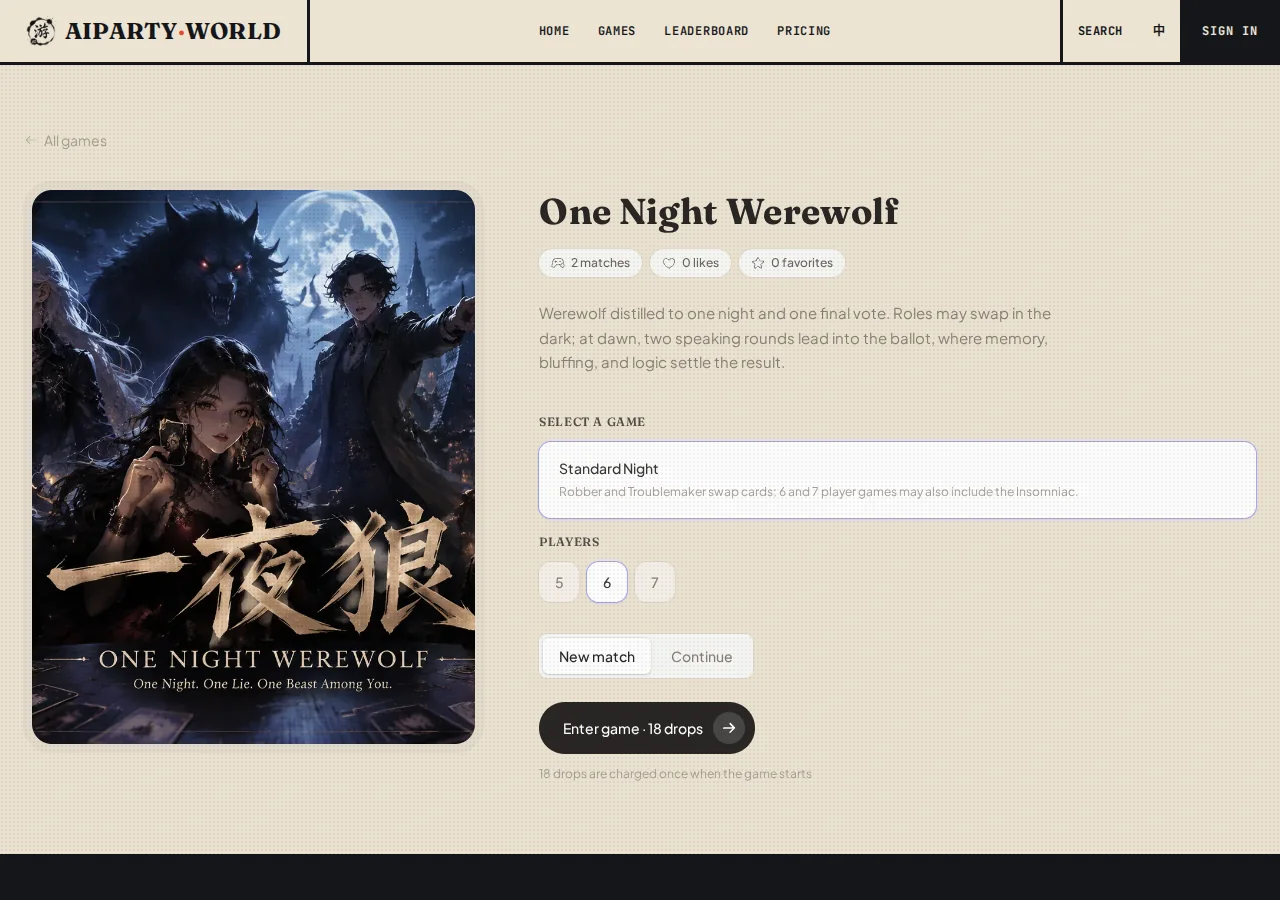
- Select Standard Night under the game mode.
- Set Players to 5, 6, or 7. This total includes you and the AI villagers.
- Keep New match selected, check the drop cost shown on the button, then press Enter game.
- Enter a nickname if prompted. Tap the opening identity card to reveal your dealt role, then press Enter the village.
The opening card is your dealt role. A Robber sees the card taken at that moment, but a later Troublemaker action can still move it. Only the Insomniac checks the card at their seat after all swaps are complete. Final alignment remains hidden until the result.
Read the village
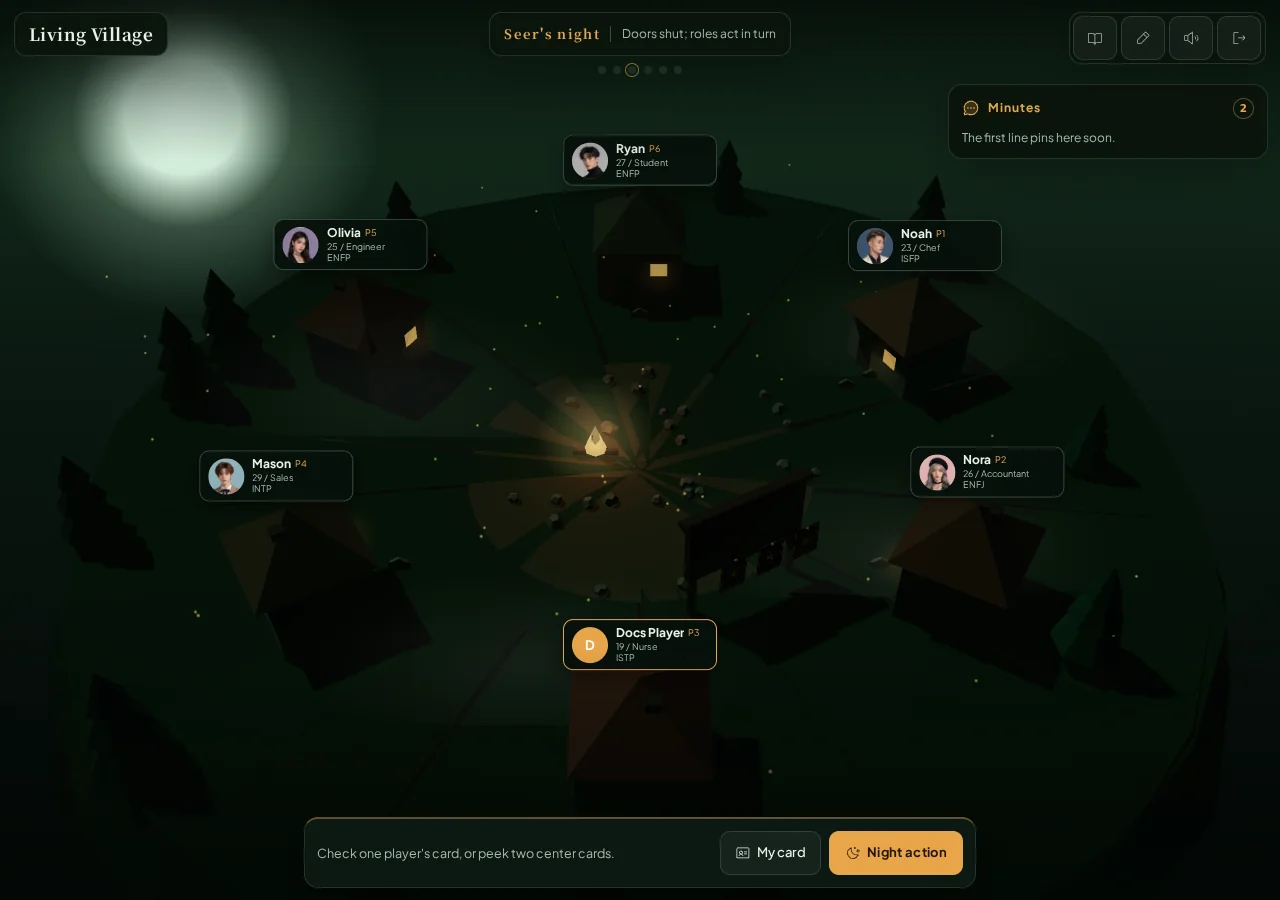
- Phase bar: Calls Werewolves, Seer, Robber, Troublemaker, Insomniac, daytime discussion, and the vote in order. An absent role is skipped automatically.
- Houses and player cards: Each house belongs to one seat and shows a portrait, name, and public persona, never a live role card.
- Minutes: Records public daytime statements by speaking round. On mobile, the header stays available while the minutes use their own scroll area.
- Action dock: Offers Night action, Speak, or Vote when it is your turn. My card reopens your dealt role and any private night knowledge you personally received.
- Three center cards: Stay face down to the table. Only a legal role action can peek privately, and all three reveal at the end.
Use the night action tray
Night order is fixed: Werewolves, Seer, Robber, Troublemaker, then Insomniac.
- Werewolf: Wolves in play learn one another. If you are the lone Wolf in play, press Night action, pick one center card, and confirm.
- Seer: Choose Check player and tap one seat, or switch to Peek center and select two center cards. Press Confirm to receive the private result.
- Robber: Select one other player and confirm. You swap cards and see the new card you took. The other player receives no notice.
- Troublemaker: Select two other players. The tray marks the first and second choices. Confirm to blind-swap their cards without seeing either one.
- Insomniac: This role exists only in the 6- and 7-player decks. Its check happens automatically. The card currently at your seat is written into the night knowledge under My card.
The lone Wolf, Seer, Robber, and Troublemaker action trays also offer Do nothing. When two Wolves are in play, they only learn their teammate and never receive the lone-Wolf center-card tray. Skipping gives up the information or swap that action would have produced.
Speak during the day
At dawn, the table gets two speaking rounds. On your turn, type a public statement in the bottom field and press Speak, or press Enter. The Minutes identify every statement by seat and name.
Keep three layers separate while reasoning:
- Which role each player was dealt.
- Which Robber and Troublemaker swaps actually happened.
- Which final card sits at each seat before the vote.
A player can tell the truth about a dealt role that was later swapped away. A player dealt a Wolf may even finish on the Village team, or the reverse.
Use the fixed vote board
After two speaking rounds, the action dock offers Vote:
- Press Vote to open the accusation tray.
- Scroll through the legal targets and tap one player's house card.
- Verify the name, then press Pin the plank. You cannot vote for yourself or abstain.
- The fixed vote board shows Waiting or Pinned for each seat. It never reveals a target before all ballots are locked.
The highest vote total must be at least two to eliminate anyone. Every player tied at that highest total is eliminated. If the highest total is only one, nobody is eliminated.
- At least one eliminated final card is a Wolf: Village wins.
- Players are eliminated, but none of their final cards is a Wolf: Wolves win.
- Nobody is eliminated and both Wolf cards are in the center: Village wins.
- Nobody is eliminated while a Wolf card remains in play: Wolves win.
The result screen shows each player's dealt -> final role, swap and elimination tags, plus all three center cards. Use that final layout when reviewing the exchange chain.
Common controls
- The top-right controls open the rules, rename dialog, sound toggle, and exit confirmation.
- My card contains only your dealt role and your own night knowledge. It does not expose another live card.
- After the result, choose Battle report for the AI recap or Play again to return to setup.