Werewolf: Illustrated Game Guide
You are the only human at a table of AI players. The game deals your seat and role at random, so you may enter as a Villager, a power role, or a Werewolf. Your job is to combine private night information, public speeches, and votes until your faction reaches its win condition.
Before the match: choose a table
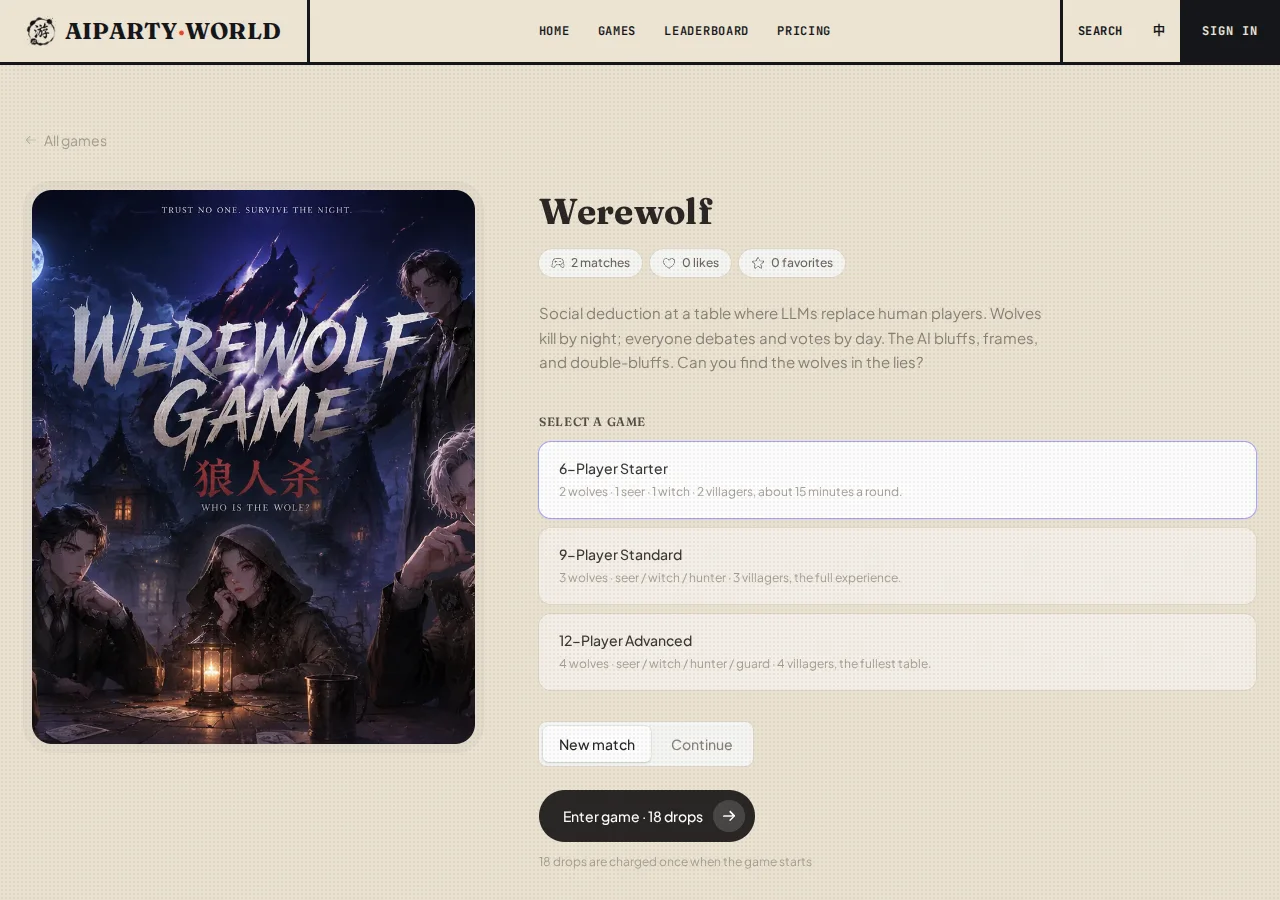
Select a setup on the game page, then start the match:
- 6-Player Starter: 2 Werewolves, Seer, Witch, and 2 Villagers. This is the quickest table to learn.
- 9-Player Standard: 3 Werewolves, Seer, Witch, Hunter, and 3 Villagers. This setup uses the edge win rule.
- 12-Player Advanced: 4 Werewolves, Seer, Witch, Hunter, Guard, and 4 Villagers. This is the fullest table and also uses the edge win rule.
The first time you play, enter a table nickname when prompted. Confirm it and press the start button. A fresh match randomizes both your role and your seat.
Factions and roles
The village
- Villager: has no night action. Read speeches, voting patterns, and contradictions.
- Seer: checks one player each night and learns whether that player belongs to the village or the wolves.
- Witch: has one Antidote and one Poison for the entire match. Only one potion may be used per night, and self-save is available on night one.
- Hunter: may shoot one player after being killed by wolves or exiled by vote. A Hunter killed by Poison cannot shoot.
- Guard: protects one player each night or skips. The same target cannot be guarded on consecutive nights, and a Guard protection plus an Antidote still results in death.
The village wins when every Werewolf has been eliminated.
The wolves
Werewolves know their pack, agree on a night victim, and then try to look trustworthy during the day.
- At a 6-player table, the wolves win when the living wolves equal or outnumber the living village faction.
- At 9 and 12 players, the wolves win when every power role or every Villager has been eliminated.
- If a table reaches its maximum day limit without a normal result, the game ends with a wolf win.
Eliminated roles are not exposed during the match. The full roster appears only on the final Roles Revealed screen, so a death without a role flip is intentional.
Reading the game screen
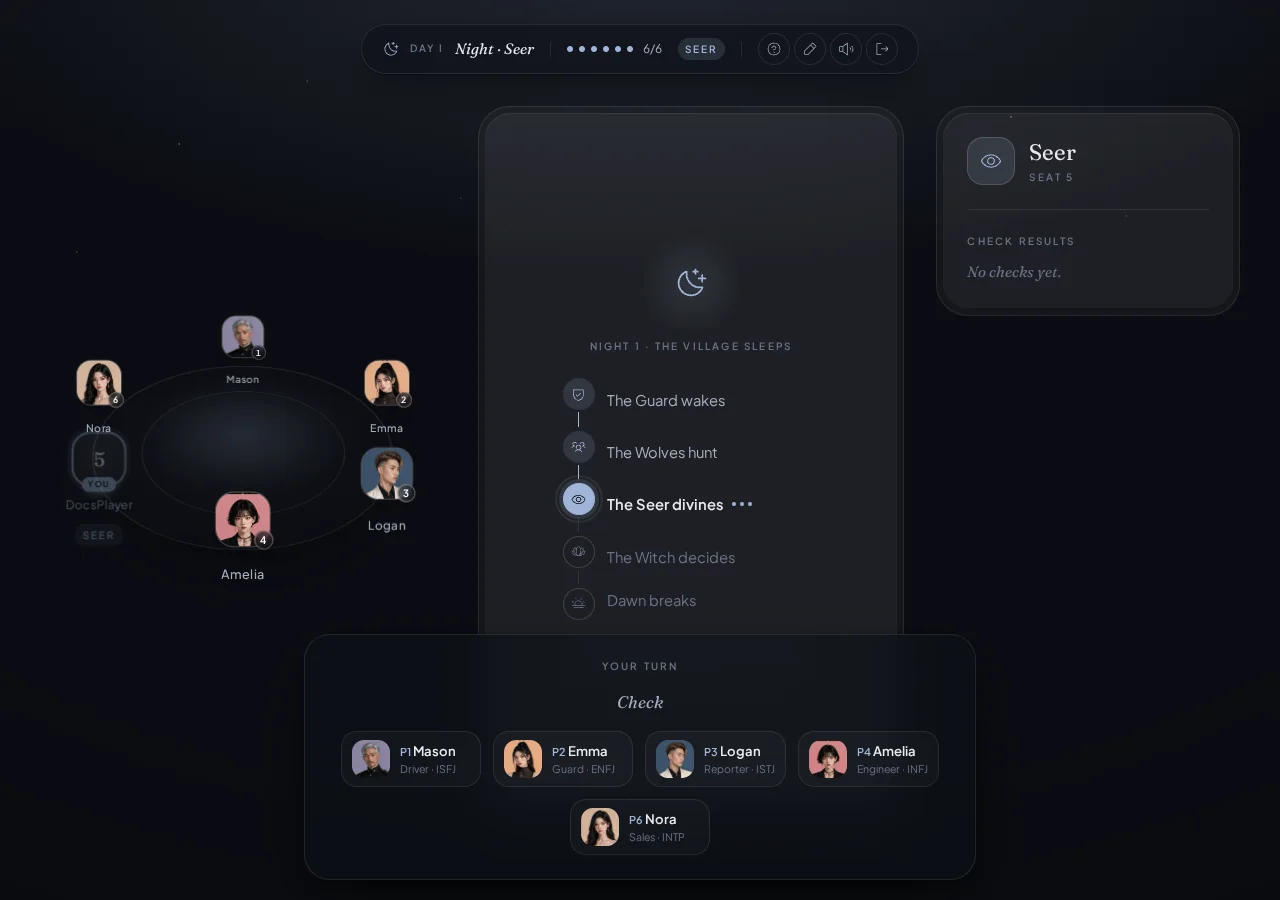
The palette changes between day and night, but the information stays in consistent places:
- The status island shows the day, current phase, alive count, and your role tag. Its buttons reopen the guide, change your name, control sound, and exit.
- The seat area is a horizontal avatar rail on mobile and a ring on wide screens.
P1,P2, and the other labels are permanent seat numbers used by speeches and votes. - The discussion record contains speeches, dawn reports, deaths, and the vote board. It scrolls independently, so a long conversation does not force you to scroll the whole page.
- Your role dossier sits on the right on desktop. On mobile, open it with the up-arrow button while the table is acting. It contains only information your role is allowed to know.
- The action dock appears at the bottom only when the game needs your input. It offers legal actions and legal targets for the current phase.
Night actions in the UI
The night resolves Guard, wolf, Seer, and Witch actions in order. You see your own private decision, never another role's secret action.
- Werewolf: choose a legal seat from the Kill target board. Your dossier lists your teammates and preserves the private wolf channel.
- Seer: choose a seat from the Check board. The result is added to the Check Results ledger in your dossier, where you can review it later.
- Witch: inspect Tonight's Kill and the current Antidote and Poison status. Choose Use Antidote, select a Poison target, or choose No Potion. Each potion is single-use and only one can be spent per night.
- Guard: select a legal seat to protect or choose Skip Guard. The previous target is shown in the dossier, and an illegal repeat target is omitted from the picker.
- Hunter: there is no ordinary night button. When a legal shot is triggered, the Shoot picker appears at the bottom, with Hold Fire as an option.
- Villager: wait for dawn. Having no button is normal.
Do not use the absence of a visible action to deduce whether another role exists. Secret actions are replaced with public status text such as “The table is deliberating.”
Day play: speak, review, and vote
Taking your speaking turn
The bottom dock offers assisted moves such as Claim Role, Accuse, Defend, Vouch, and Pass. For Accuse, Defend, or Vouch, pick a seat after choosing the move. The UI writes an editable draft into the text box. Rewrite it as much as you like, then press Submit. You can also ignore the shortcuts and type your own statement.
A useful speech identifies who you trust or suspect, cites a specific statement or night result, and states your likely vote. A role claim without supporting logic is easy for a wolf to copy.
Following the vote board
When the table enters The Vote, the discussion record shows which seats have locked a ballot. Individual choices stay hidden until everyone has acted, then the board reveals the tally and result together.
Casting your ballot
Choose an avatar card labeled with both seat and name in the bottom target picker. Day votes also offer Abstain.
- A unique top-voted player is exiled.
- A tie for the top count eliminates nobody.
- If everyone abstains, nobody is eliminated.
Abstaining does not remove you from later win checks. It only means you cast no target this day.
Elimination, ending, and recap
After you are eliminated, the interface switches you to spectator mode. You cannot speak or vote, but you may watch until the match ends. The final screen reveals every role at once and opens the AI recap with an MVP, your grade, the turning point, and notes on each player. Save Report exports a shareable result image, while Roast / Praise lets you discuss the match with the AI for a few more exchanges.
Control reference
- Question mark: reopen the short in-game tutorial.
- Pencil: change your table nickname.
- Sound: mute or restore ambience and cues.
- Exit: open a confirmation dialog. Leaving ends the current match and it cannot be resumed.
- Mobile up arrow: open your private role dossier.
- Play again: return to setup for a new role and seat.
For a first match, keep your eyes on the phase at the top and the action dock at the bottom. The game advances the rules automatically; you only need to complete the action shown when “Your turn” appears.