Undercover: Illustrated Game Guide
Undercover is a social deduction game built around two similar words. Most players receive one word, while a smaller faction receives a related but different word. Give clues that help your side recognize you without handing the other faction the answer.
You are the only human at a table of AI players. If you receive a word, the game does not tell you whether it is the civilian or undercover word. Only the blank is explicitly told that no word was dealt.
Before the match: mode and table size
Choose a mode, then choose 6, 8, or 10 players:
- Classic Undercover: 6 players has 5 civilians and 1 undercover; 8 players has 6 civilians and 2 undercover players; 10 players has 8 civilians and 2 undercover players.
- Blank game: replaces one civilian in the matching setup with 1 blank. The blank receives no word and belongs to the undercover faction.
Confirm your nickname and start. Seats, roles, and the word pair are randomized for each new match.

Faction goals
- Civilians: all receive the same civilian word. They win by eliminating every undercover player and the blank.
- Undercover players: receive a similar but different word. They must blend in while working out the civilian word.
- The blank: receives no word and must infer the subject from public clues.
Undercover players and the blank win together. The undercover faction wins as soon as its living members equal or outnumber the living civilians. It also wins if repeated ties carry the match to the round limit.
Read your private word first
The match opens with a face-down word card. Tap it to flip:
- A dealt word appears by itself. The card does not identify it as civilian or undercover.
- The blank sees “You are the blank” and a short blending-in hint.
Tap again to close the card. During play, your word remains available on the gold Your word plinth on the stage or in the gold chip in the action dock. Never paste the exact word into your clue.
Reading the match screen
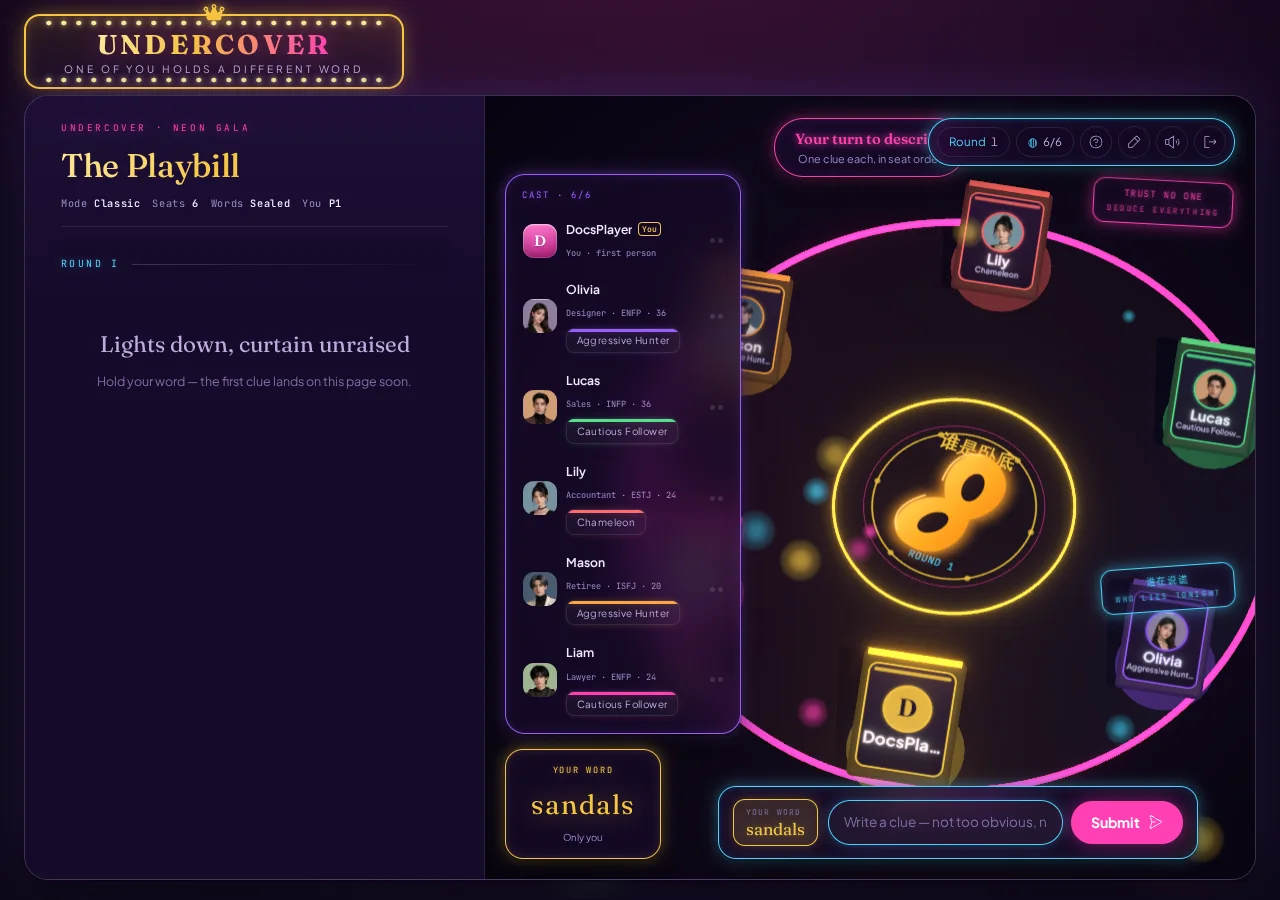
The screen is presented like a neon playbill with a column and a stage:
- The gold masthead and narrator identify the current Describe, Vote, or final phase and tell you who is acting.
- The control island shows the round and living-seat count. Its buttons reopen the guide, change your name, control sound, and exit.
- The cast roster pairs every
Pseat number with a name, avatar, and persona.ON AIRmarks the current speaker, while eliminated players show their exit round. - The clue column preserves every statement, ballot result, and publicly revealed word by round. It scrolls independently from the rest of the screen.
- Your word appears only in your private card and dock. Other players' words and roles remain hidden during play.
- The bottom action dock becomes either a clue composer or a vote target board when the game needs your input.
Playing a round in the UI
1. Give one clue
Every living player speaks once in seat order. When it is your turn, a one-line composer appears at the bottom:
- Type one clue related to your word, up to 120 characters.
- Check that you did not write the exact word or simply repeat another player's angle.
- Press Submit.
A strong clue does two jobs. It sounds familiar to players holding the same word, but it withholds enough detail that the other faction cannot solve it immediately. For “coffee,” “I need it before an early shift” is safer than listing “black, beans, caffeine.”
As the blank, look for the shared theme across earlier clues, then contribute something broad but meaningful. Empty filler often attracts votes.
2. Trace the clue history
Each line in the clue column includes the speaker's seat and name. Compare a player's statements across rounds instead of judging one sentence in isolation. On wide screens, hovering over a clue visually connects it to the matching cast entry.
3. Vote
Once every living player has described, the match enters a secret ballot. Voting is mandatory.
- On wide screens, click a highlighted legal seat in the cast roster. The dock updates to “Vote for P# Name.” Press Confirm vote to lock it.
- On mobile, the bottom dock expands into target cards labeled with seat, name, and avatar. Tap the target to submit.
The vote board first shows which players have locked a choice without exposing their targets. When all ballots are in, the full tally and voters are revealed together.
Elimination, ties, and public information
- A unique top-voted player is eliminated and that player's own word is revealed immediately. If the player was the blank, the game reveals their blank role.
- A tie for the top count eliminates nobody and reveals no additional word. Every survivor returns for another clue round.
- During the match, only an eliminated player's own word becomes public. The complete role roster and both faction words wait until the final screen.
An eliminated word is the strongest evidence on the board. Use it to reinterpret earlier clues: who consistently described that concept, who avoided its shared features, and who suddenly changed direction?
Winning and spectating
- Civilians win when every undercover player and blank has been eliminated.
- The undercover faction wins when its living count equals or exceeds the civilian count.
- The undercover faction also wins if the match reaches its round limit without another result.
If you are voted out, you enter spectator mode and can no longer describe or vote, but you may watch the remaining rounds. The final edition reveals the civilian word, undercover word, and every seat's role and word. Open View recap for the AI's MVP, your grade, the key vote, and the turning point.
Control reference
- Word card or gold Your word area: review your word or blank reminder.
- Question mark: open the short tutorial.
- Pencil: change your table nickname.
- Sound: mute or restore audio.
- Exit: confirm and end the current match.
- Clue column: review statements, ballot tallies, and revealed words.
- Play again: return to setup and choose a new mode or table size.
For your first game, remember your word and watch for the player whose clue direction differs from the majority. The bottom dock always tells you whether the game currently needs a clue or a vote.